Windows Kernel Exploitation
This journey was a project I worked on between classes before deciding to make it my final project for my Security 2 class. This will start by diving into Windows internals then reverse engineering and finally exploiting. However, as it stands right now the exploit just results in bluescreening the target machine. I will continue learning with this project in the future as it has already been a great learning adventure.
The Windows Kernel
- The kernel is implemented as the kernel layer, the executive layer and drivers.
- The kernel and executive layers are implemented in the kernel image, ntoskrnl.exe
- Kernel Layer
- Contains code for thread scheduling, locking, synchronization and basic kernel object management
- Executive Layer
- Contains code for security enforcement, object management, memory management, logging, and Windows Management Instrumentation, among other things.
- Kernel Drivers
- Most kernel drivers are .sys files, but a few kernel components are DLLs (ie, hall.dll, ci.dll)
- A .sys file is a Portable Executable file just like an EXE or DLL
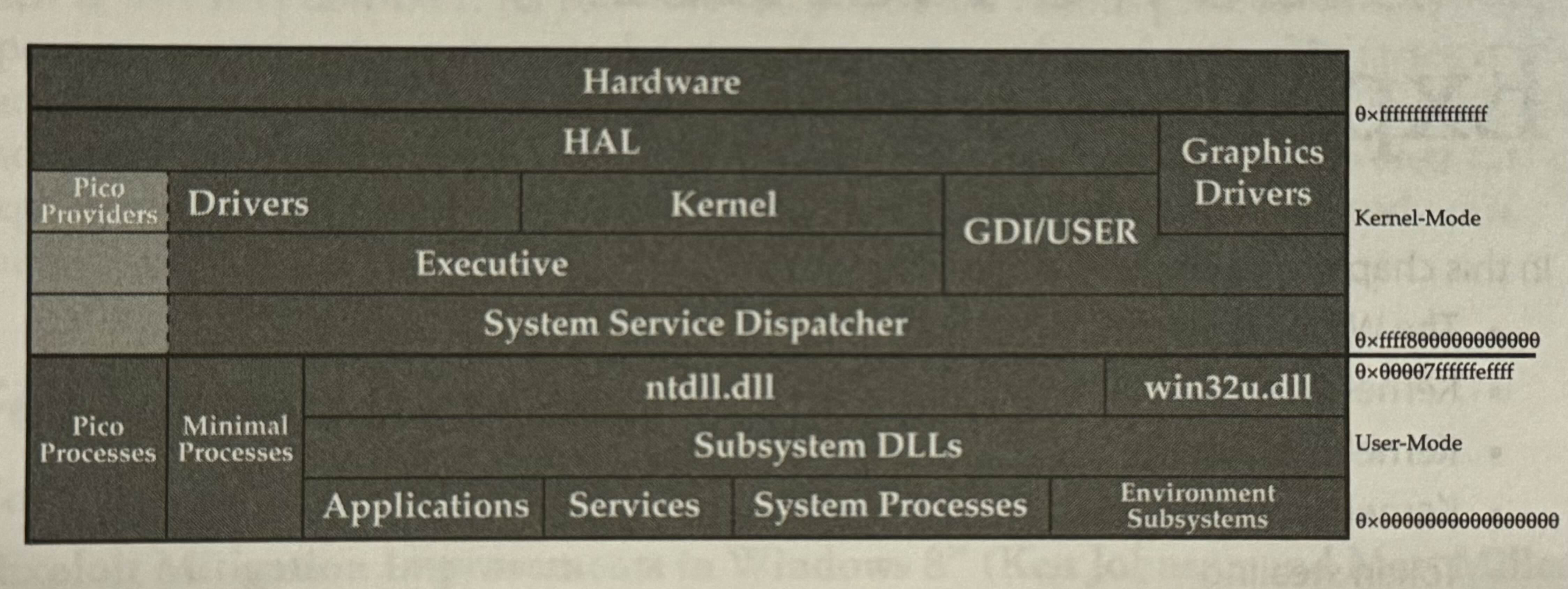
- User-mode
- Run on top of the Windows Subsystem (kernel32.dll, user32.dll etc), are built for the native API directly (ntdll.dll and win32u.dll), or are run as minimal/pico processes and talk directly to the System Service Dispatcher (AKA system call handler) which takes requests from user mode and dispatches them to the kernel.
- Crossing the line between User-mode and Kernel-mode there is a jump in addresses. Memory is segmented like this due to historical and processor-specific reasons. It just so happens there are two distinct canonical memory spaces with a large non-canonical gap in the middle to divide memory belonging to kernel space (ring 0) and user space (ring 3).
- Some drivers like graphics might talk directly to hardware while others use the Hardware Abstraction Layer (HAL). The HAL is an architecture- and platform-agnostic library for interacting with hardware. Recent versions of windows 10 (20H1+) implement the HAL inside of the kernel image and hal.dll is just a forwarding DLL that is still around for compatibility.
Kernel Drivers
- Extensions to the kernel that can help the system:
- Interact with previously unknown devices or file systems
- Provide an interface for kernel introspection to user mode
- Modify how the kernel functions
- Heavily discouraged by Microsoft. MS introduced Kernel Patch Protection (AKA PatchGaurd) to prevent developers from tampering with core system routines and data structures.
- Boot drivers
- Loaded at boot by the bootloader
- Other drivers are loaded by service manager post boot
- Only admins or users with SeLoadDriverPrivilege can load drivers on a Windows System
- Microsoft does not consider the boundary between sys admin and the kernel a security boundary since admins can load (nearly) arbitrary drivers anyway.
- Drivers must have an acceptable digital signature in order to be loaded since kernel-mode code signing (KMCS) is enforced by default on all 64-bit machines.
Driver functions
-
Can provide I/O routines in the form of major functions
-
Windows Driver Kit (WDK) defines 28 major functions such as:
- Create
- Close
- Power
- I/O control
- Read
- Write
- Query Information
- Set Information
- Shutdown
- These are constant integer values defined in the WDK headers
- Major function’s symbol names begin with
IRP_MJ_and are indices into the major function array of the_Driver_Objectstarting at 0x70. - Major function handlers are also called driver dispatch routines and have the following protoype:
NTSTATUS DriverDispatch(
	_DEVICE_OBJECT *DeviceObject,
	_IRP *Irp
)
-
Handlers for each major function are set inside of a driver’s
_Driver_Objectstructure when the driver is initialized.- The
_Driver_Objectstructure contains information about the driver- Name of the driver
- Linked list of devices associated with the driver
- Optional unload routine
- Called when ‘driver unload’ is requested
- Memory bounds of the driver (start and size)
- The
-
A driver can create other associated
_Driver_Objectstructures- These represent a device that the caller driver is responsible for
- These devices cannot be backed by hardware
- An example of a driver not backed by hardware is Sysinternal Process Explorer.
- Process Explorer is a Microsoft signed driver that is loaded when the tool starts and user-mode APIs are used to communicate with it. The driver then creates a user mode accessible device object and services requests from user mode via the I/O system in the kernel. Finally, the kernel’s I/O system dispatches requests to the major function handler routine which is defined in the
_Driver_Objectthe device belongs.
- Process Explorer is a Microsoft signed driver that is loaded when the tool starts and user-mode APIs are used to communicate with it. The driver then creates a user mode accessible device object and services requests from user mode via the I/O system in the kernel. Finally, the kernel’s I/O system dispatches requests to the major function handler routine which is defined in the
- These represent a device that the caller driver is responsible for
Driver I/O
-
I/O Request Packet (IRP)
- Describes an I/O request to the device and has many fields
- Notable fields:
- `AssociatedIrp.SystemBuffer
- Often includes and/or output buffer for the request
- `Tail.Overlay.CurrentStackLocation
- Information about the request relevant to the specific device being called.
- Important information in the
CurrentStackLocation(IO_STACK_LOCATION) includes:MajorFunction: current major function being requested.Parameters: A massive union that contains different information depending on the major function being called.
- `AssociatedIrp.SystemBuffer
-
With device I/O control the
MajorFunctionwill beIRP_MJ_DEVICE_CONTROL(14)- The
Parametersfield will describe the I/O Control (IOCTL) code being called as well as the input and output buffer sizes. - The input and output buffer will be in the
AssociatedIrp.SystemBufferfield of the_IRPfor most IOCTL calls. IOCTL codes
- The
-
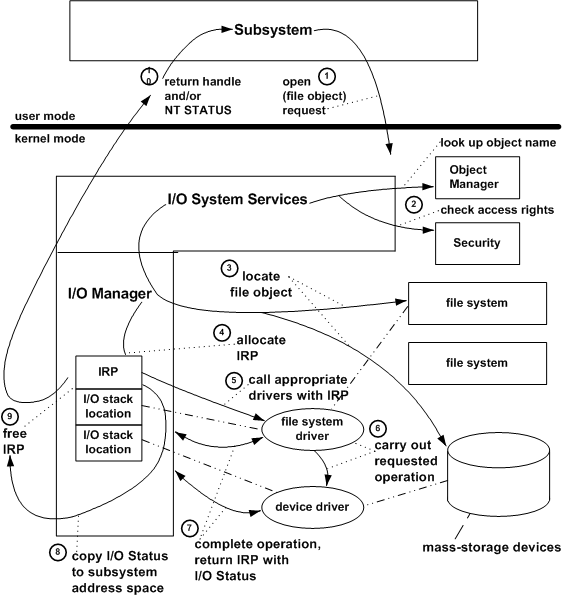
Example request:
-
The subsystem calls an I/O system service to open a named file.
-
The I/O manager calls the object manager to look up the named file and to help it resolve any symbolic links for the file object. It also calls the security reference monitor to check that the subsystem has the correct access rights to open that file object.
-
If the volume is not yet mounted, the I/O manager suspends the open request temporarily and calls one or more file systems until one of them recognizes the file object as something it has stored on one of the mass-storage devices the file system uses. When the file system has mounted the volume, the I/O manager resumes the request.
-
The I/O manager allocates memory for and initializes an IRP for the open request. To drivers, an open is equivalent to a “create” request.
-
The I/O manager calls the file system driver, passing it the IRP. The file system driver accesses its I/O stack location in the IRP to determine what operation it must carry out, checks parameters, determines if the requested file is in cache, and, if not, sets up the next-lower driver’s I/O stack location in the IRP.
-
Both drivers process the IRP and complete the requested I/O operation, calling kernel-mode support routines supplied by the I/O manager and by other system components (not shown in the previous figure).
-
The drivers return the IRP to the I/O manager with the I/O status block set in the IRP to indicate whether the requested operation succeeded or why it failed.
-
The I/O manager gets the I/O status from the IRP, so it can return status information through the protected subsystem to the original caller.
-
The I/O manager frees the completed IRP.
-
The I/O manager returns a handle for the file object to the subsystem if the open operation was successful. If there was an error, it returns appropriate status to the subsystem.
Kernel Debugging
- A user-land (ring 3) debugger is only capable of debugging individual programs that run on top of the kernel.
- A kernel-land (ring 0) debugger is required to debug the kernel.
- Kernel debugging is usually done between two systems
1. System running the debugger
2. System being debugged
- Two systems are needed because unlike in a ring 3 debugger where a single program is suspended, stopping the whole kernel would prevent you from interacting with the system to run commands or resume it.
- One exception to this is known as “local” kernel debugging
- This allows the convenience of debugging the currently running system’s kernel
- Drawbacks of this kind of debugging:
- You cannot halt the running system. This means you can’t set or inject any breakpoints or debug on a crash.
- Values in memory might be changing rapidly
- WinDBG is the only officially supported (and thus recommended) ring0 debugger for Windows.
- Offers many different transports over which to debug the kernel
- Network debugging is the most reliable, efficient and consistent setup for kernel debugging.
Lab 14-1: Setting Up Kernel Debugging
Debugee
- As admin, run
bcdedit.exe /debug on - As admin, run
bcdedit.exe /dbgsettings net hostip:1.1.1.1 port:50000 - Take note of your generated key and local ip address
- Reboot to enter debug mode
Debugger
- Open WinDBG
- File > Attach to kernel
- Enter the port, key and IP address
- Once connected, hit ‘Break’. Prompt should become active at breakpoint (int 3) that is at a kernel address starting with
0xfffff
Lab 14-3: Reverse Engineering the Driver
-
When searching for vulnerabilities in compiled programs it is good practice to start looking for function calls that manipulate memory
strcpy,memcpy,memmove
-
Open cross-references to the
memmovefunction (x key in IDA)- Review each and trace the arguments (rcx, rdx, r8)
- See if any can be controlled.
- Keep in mind that
_IRP->AssociatedIrp.SystemBufferand_IO_STACK_LOCATION->Parameters.DeviceIoControlstructures are directly controllable from usermode. - Also keep in mind that
System BufferandInputBufferSizewere moved intoDeviceExtensionat offsets 0 and 8 respectively. - We can look for positions where we can manipulate data. This is easier when we see jumps and tests comparisons
-
Note the
memmovecall insub_15294- Locate which values are passed into the parameters for
memmoveby tracing back in the program. This way we can determine where the parameter values originate
- Locate which values are passed into the parameters for
-
We now know that:
- rax : from rbx+0x10
- r9 : from rbx
- rcx : from rdi in the major function handler
-
We determined earlier that rdi holds a pointer to
DeviceExtensionwhich holds a pointer toSystemBuffer(a user input buffer!) at offset 0 and the size of the user input buffer at offset 8- This means that r9 in sub_15294 is a pointer to the input buffer which should give us control of at least the source/destination and the size of the call to
memmove
- This means that r9 in sub_15294 is a pointer to the input buffer which should give us control of at least the source/destination and the size of the call to
-
Next, we need to figure out how to reach this code path.
- We look for which IOCTL codes lead to he preceding block. We see two:
- One zeros out edx
- One moves 1 into dl
- Remember that in
sub_15294:loc_152E1there is the test of dl which determines if we use the pointer from r9 as the source or the destination of thememmovecall. - Tracing up the two, we see the two IOCTL codes:
mov dl,1: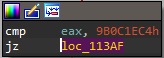
xor edx,edx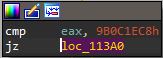
- We look for which IOCTL codes lead to he preceding block. We see two:
Lab 14-4: Interacting with the Driver
- Attach kernel debugger and get the offset of the
memmovefunction.- In IDA, we can calculate the offset by having our cursor on the function and running
get_screen_ea() - get_imagebase() - Note: Offset= <function> - <imagebase>
- in this case IDA returns 5301h which is ofc
0x5301- Image base:
0x10000Function: `0x15301
- Image base:
- In IDA, we can calculate the offset by having our cursor on the function and running
- Ensure the kernel driver is loaded in the target system
driverquery
- Set a breakpoint on the function in WinDBG
- Issue the
bpcommand with the driver name and relative offsetbp dbutil_2_3+0x5294- use
.reloadif windbg is angry abt resolving that bp
- Issue the
The Driver not persisting
The driver is loaded into C:\Users\<user>\AppData\Local\Temp\ so it will not persist across reboots.
- To allow the driver to persist (though not necessary):
- Move the .sys file to C:\Windows\System32\drivers
- Create a persistent service for the driver:
sc create DBUtil_2_3 type= kernel binPath= "C:\Windows\System32\drivers\DBUtil_2_3.sys"sc start DBUtil_2_3
Installing vulnerable drivers on Windows 11
Drivers that are marked as being vulnerable popup with a warning before installing a vulnerable driver: ![[Pasted image 20241030215900.png]] To get past this we will automate the process.
The Code
- Written in Rust: https://github.com/Mauzy0x00/dbutil_2_3-Exploit
- Try hitting the breakpoint
- use
cargo run --bin ioctlcall 0x9B0C1EC4 112233445566778899101112131415161718192021222324
- use
- When the breakpoint hits
- We can examine arguments using
dqs- For example:
dqs @rcx
- For example:
- We can examine arguments using
Token Stealing
KPROCESS
EPROCESS
A huge struct that holds all data about system processes
ActiveProcessLinks List
- ActiveProcessLinks.Flink = Forward link (Pointer to next address in the doubly linked list)
- ActiveProcessLinks.Blink = Backward link (Pointer to the previous address in the doubly linked list)
Token
Each process has a security token associated with it.
- Member of
_EPROCESS - A reference-counted pointer to a
_TOKENstruct- This is the primary token for the process.
- The token for a process inherits the permissions of the parent process unless overwritten
- The system process (ntoskrnl.exe [NT OS kernel]) always has process ID 4 and has a fully privileged token with SYSTEM permissions.
Lab 14-5: Arbitrary Pointer Read/Write
Image of debugging ![[Pasted image 20241204215930.png]]
Running the exploit without the driver loaded in the system ![[Pasted image 20241204220458.png]]
Blue screen cause? ![[Pasted image 20241204205013.png]] This is the IOCTL code for reading! - watch out when copy and pasting
- nope
Incorrect Offset for win11? Started on win 10 ![[Pasted image 20241204220058.png]] Definitely doesn’t match! will that fix it? This looks up the base of the EPROCESS structure for these three fields
- Looks like that was it! But now the OS is onto us… rats. ![[Pasted image 20241204220917.png]]
- rats ![[Pasted image 20241204221016.png]]
- heck ![[Pasted image 20241204221430.png]] ![[Pasted image 20241204221713.png]] ![[Pasted image 20241204224035.png]] ![[Pasted image 20241204224054.png]]
- Takes a Hash of the binary and manipulates it or deletes it. Need to recompile with different code for it to run again ![[Pasted image 20241204222231.png]] ![[Pasted image 20241204222428.png]]
- Access violation! But that was the point! guh
- It got me. Change registry key?
- Nope, windows doesn’t provide a way to suppress SYSTEM_SERVICE_EXCEPTION
![[Pasted image 20241204224701.png]]
- After some more playing around.. Can’t seem to get away with touching the addresses I want to.
VirusTotal output ![[Pasted image 20241204221903.png]]
- win 11 result ![[Pasted image 20241204225052.png]] DEFEAT Will need more research on Bug Checks and how to avoid it.
The Windows kernel has always been able to stop itself, and thus the whole of Windows, if something has gone so seriously wrong that execution can’t continue—or just wrong enough to doubt the safety of even trying to continue. The documentation’s description of an “immediate, controlled shutdown” must of course be understood as relative. The system does what it can—and it tends not to be appreciated even nearly enough how much work Microsoft has put in to this—but what can be done cannot be much. - Geoff Chappell https://www.geoffchappell.com/studies/windows/km/bugchecks/index.htm ![[Pasted image 20241204231636.png]]